
Run Walk Interval Timer
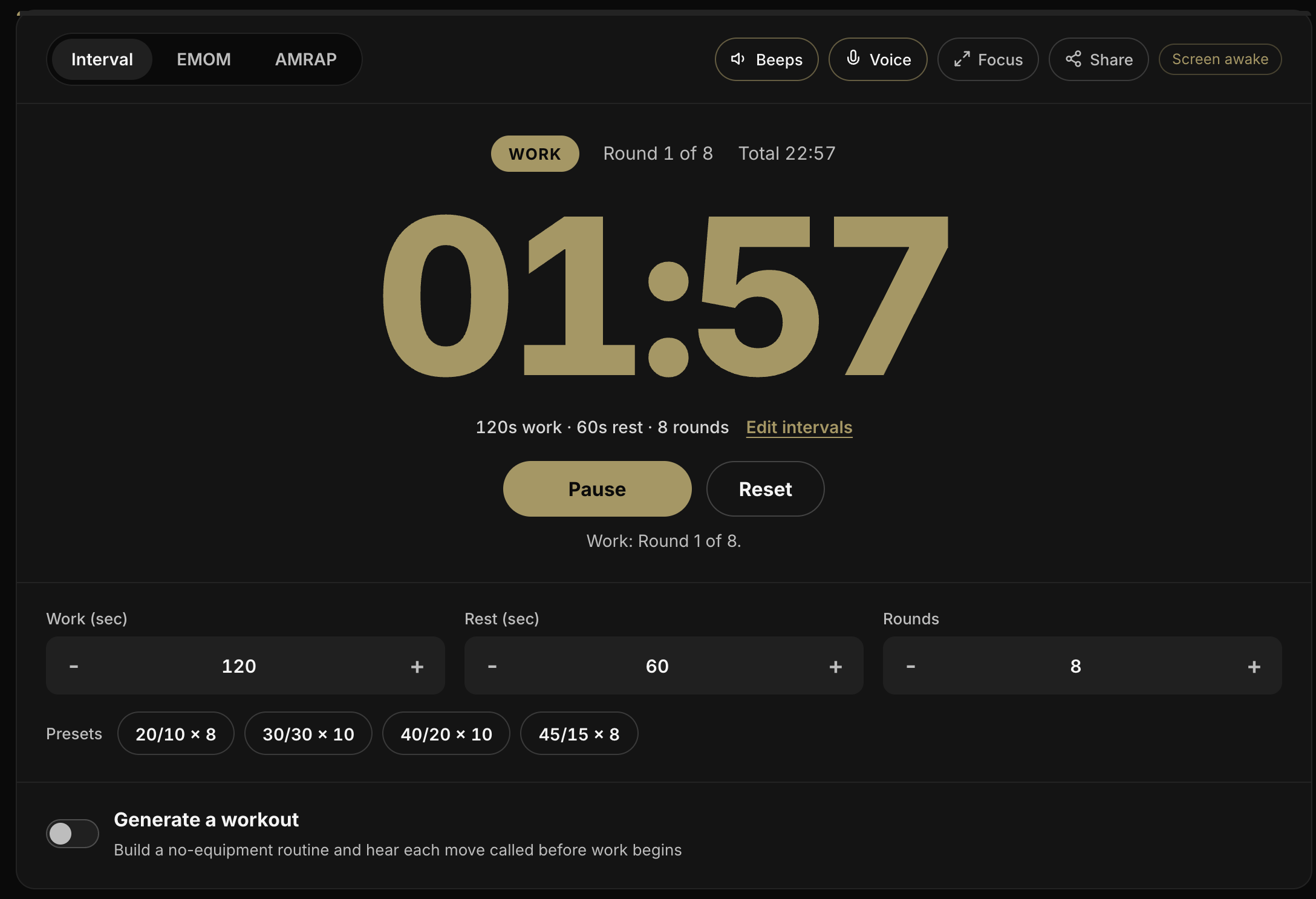
Pre-configured to 2 minutes of running (120s Work) and 1 minute of walking (60s Rest) across 8 rounds for a 23-minute active session. Press Start for 3-2-1 countdown beeps and spoken phase cues, or edit seconds to match any walk run interval timer plan.
How This 2-Minute Run, 1-Minute Walk Preset Runs
IntervalCue uses one shared interval clock across every training style, so the display labels your running segment as Work (120 seconds) and your walking segment as Rest (60 seconds). Eight rounds deliver 16 minutes of easy running and 7 minutes of structured walking in 23:00 of active elapsed time.
- Run phase (Work)
- 120 seconds (2:00 gold clock, double high start chime)
- Walk phase (Rest)
- 60 seconds (1:00 white clock, lower rest chime)
- Default session
- 8 rounds (23:00 active elapsed, 24:00 with a 1-min cooldown walk)
- Audio callouts
- 3-2-1 countdown ticks plus spoken Start, Rest, Work, and Workout complete
- Custom range
- Edit Work (3 to 3600s), Rest (0 to 3600s), and up to 99 rounds
Run-Walk Cadence Reference: 1:1, 2:1, Run-Walk-Run & Couch to 5K
Every popular walk run interval timer plan translates directly into Work (run seconds), Rest (walk seconds), and Rounds in the clock above. Pick a cadence that keeps breathing steady from round one to the finish.
| Cadence / Program | Work (Run) / Rest (Walk) | Typical Rounds & Time | Best Fit |
|---|---|---|---|
| Couch to 5K Week 1 | 60s run / 90s walk | 8 rounds (18:30 active / 20 min) | Beginners starting a couch to 5k timer online after a 5-min brisk warm-up walk |
| Couch to 5K Week 2 | 90s run / 120s walk | 6 rounds (19:00 active / 21 min) | Second-week build adding 30 seconds of jogging while keeping walk recovery generous |
| 1:1 Balanced Split | 60s run / 60s walk | 10 to 15 rounds (19 to 29 min) | Returning runners, easy aerobic days, and steady effort without rushing transitions |
| 2:1 Standard (Page Default) | 120s run / 60s walk | 8 rounds (23:00 active / 24 min) | Stepping up toward continuous 20 to 30 minute jogs with 16 total minutes of running |
| Run-Walk-Run Method (Short) | 60s run / 30s walk (or 30s / 30s) | 16 to 24 rounds (24 to 36 min) | Frequent planned walk breaks from minute one to manage fatigue on longer outings |
| Run-Walk-Run Method (Steady) | 180s run / 60s walk (or 240s / 60s) | 6 to 10 rounds (23 to 49 min) | Experienced 5K to half-marathon runners pacing steady miles with brief 1-minute resets |
Setting Up Your Run-Walk Timer, Headphones & Mobile Screen
How run-walk pacing works, how Work and Rest map to running and walking, what you hear through earbuds outdoors, and honest mobile lock-screen behavior.
What run-walk interval training is (and how Work / Rest maps here)
A run walk interval timer alternates planned jogging blocks with scheduled walking recoveries from the very start of your session. Instead of jogging until breathing spikes and stopping unpredictably, structured intervals help you manage perceived effort, hold steadier form, and build weekly aerobic time gradually. Because every person adapts at a different pace, start at an easy conversational jog and dial back duration or rest days whenever joints feel unusually sore.
On IntervalCue, this page embeds the exact same interval engine as the homepage clock with no separate download or account. The phase badge reads Work (gold clock) during your run block and Rest (white clock) during your walk block. By default, Work is set to 120 seconds (2 minutes of running), Rest is set to 60 seconds (1 minute of walking), and Rounds is set to 8.
How to set up custom run-walk, Run-Walk-Run, and Couch to 5K splits
Leave the mode selector on Interval and keep Generate a workout switched off when running outdoors or on a treadmill (the exercise generator is built for indoor bodyweight circuits). To change your ratio, enter seconds directly into Work (sec) for running and Rest (sec) for walking: use 60 and 60 for a 1:1 walk run interval timer, 60 and 90 across 8 rounds for a Couch to 5K Week 1 session, or 180 and 60 for a 3:1 run walk run method timer.
Total elapsed time updates automatically in the stage header and skips rest after your final round, so 8 rounds of 120s work and 60s rest displays Total 23:00 (16 minutes running, 7 minutes walking). Open Share in the top toolbar to save up to six weekly progressions in browser localStorage or copy a share link that loads your exact intervals in Ready state without auto-starting.
Outdoor headphones, voice cues, and countdown ticks
Keeping both Beeps and Voice active lets you follow every switch by ear through Bluetooth or wired earbuds without staring down at your phone. Pressing Start unlocks local Web Audio synthesis and browser Web Speech: round one opens with a double high chime and spoken Start, the final three seconds of every block play crisp 3-2-1 warning ticks, walking recovery triggers a lower chime plus Rest, each new run block triggers a high chime plus Work, and round eight closes with a three-note chime and Workout complete. Before heading out, raise media volume and switch off the iPhone physical silent toggle so spoken cues play cleanly. Everything runs locally in your browser once loaded, even if cellular signal drops on a trail.
Phone screen wake lock and honest lock-screen limits
On modern browsers that support Screen Wake Lock (including Chrome, Edge, and recent Safari), IntervalCue keeps your display awake while the timer runs on a treadmill shelf, armband, or handheld strap, then releases the lock on Pause or Reset. However, mobile Safari and iOS browsers pause JavaScript timers and Web Speech as soon as you lock your screen or switch apps. Keep the browser tab open in the foreground throughout your run-walk workout; if you prefer training with a locked phone tucked away, pair your runs with a dedicated sports watch or compare standalone displays in our gym interval timer guide. For shorter aerobic running repeats once 2:1 feels comfortable, try our 30/30 interval timer.
Four Steps to Run a Clean 30-Minute Walk-Run Session
-
Warm up with a 5-minute brisk walk before pressing Start
Ease ankles, calves, and hips into motion first so your opening 2-minute run block feels relaxed instead of stiff.
-
Keep every Work (run) block at conversational effort
Aim for an easy jog where you could speak a short sentence. If breathing gets ragged by round three, slow your stride or trim Work from 120 seconds down to 60 or 90 seconds.
-
Use Rest (walk) intervals for steady active recovery
Drop straight into a purposeful walk when the lower chime and Rest callout play, relax your shoulders, and transition smoothly back to jogging on the 3-2-1 warning ticks.
-
Walk 2 to 5 minutes after Workout complete
Because the clock skips rest after round 8 (23:00 active elapsed), keep walking for a few minutes after the finish chime to let your heart rate settle and round out a full 30-minute session.
Run Walk Interval Timer FAQ
Direct answers on Work and Rest labels, Couch to 5K presets, Run-Walk-Run ratios, headphone audio, and iPhone lock-screen limits.
Why does the run walk interval timer show Work and Rest instead of Run and Walk?
IntervalCue runs every conditioning format on one shared interval engine. On this page, Work equals your running segment (default 120 seconds) and Rest equals your walking segment (default 60 seconds), so you get crisp phase chimes and color contrast without installing a separate running app.
How do I set up a 2 minute run, 1 minute walk timer?
This page loads ready to go at Work 120 seconds, Rest 60 seconds, and 8 rounds, giving 23:00 active time (16 minutes of running and 7 minutes of walking). Press Start right away, or edit Work, Rest, and Rounds directly in seconds to match any custom split.
Can I use this as a Couch to 5K timer online?
Yes for fixed-interval weeks and custom progressions. Set Work to 60, Rest to 90, and Rounds to 8 for Week 1, or Work 90, Rest 120, and Rounds 6 for Week 2. Because the clock repeats one Work and one Rest duration per round, mixed-length weeks that combine 90-second and 3-minute jogs work best by running two short saved plans back to back.
How does a run walk run method timer help on longer sessions?
Taking scheduled walk breaks from the opening minutes keeps pacing steadier than running nonstop until fatigue forces an unplanned stop. Set a short cycle such as 60s run / 30s walk or a steady split like 180s run / 60s walk in the controls above, then save up to six plans locally via Share.
Will the timer keep running if I lock my iPhone screen in my pocket?
No. Mobile Safari and iOS browsers pause JavaScript timers and Web Speech as soon as the screen locks or moves to the background. Keep the browser tab visible in the foreground (on a treadmill console, armband, or handheld strap) where Screen Wake Lock keeps supported displays lit, or use a dedicated sports watch for locked-pocket outdoor runs.
Do the voice cues and countdown beeps work through Bluetooth headphones?
Yes. Synthesized Web Audio beeps and Web Speech callouts (Start, Rest, Work, and Workout complete) play locally through connected Bluetooth or wired earbuds once the page loads, with no audio file downloads. Raise media volume and turn off the iPhone silent switch before starting.