
HIIT Workout Generator
Build a no-equipment bodyweight routine in seconds by duration, intensity, body focus, and skip filters such as no jumping or no floor. Press Start to hear every move called aloud.
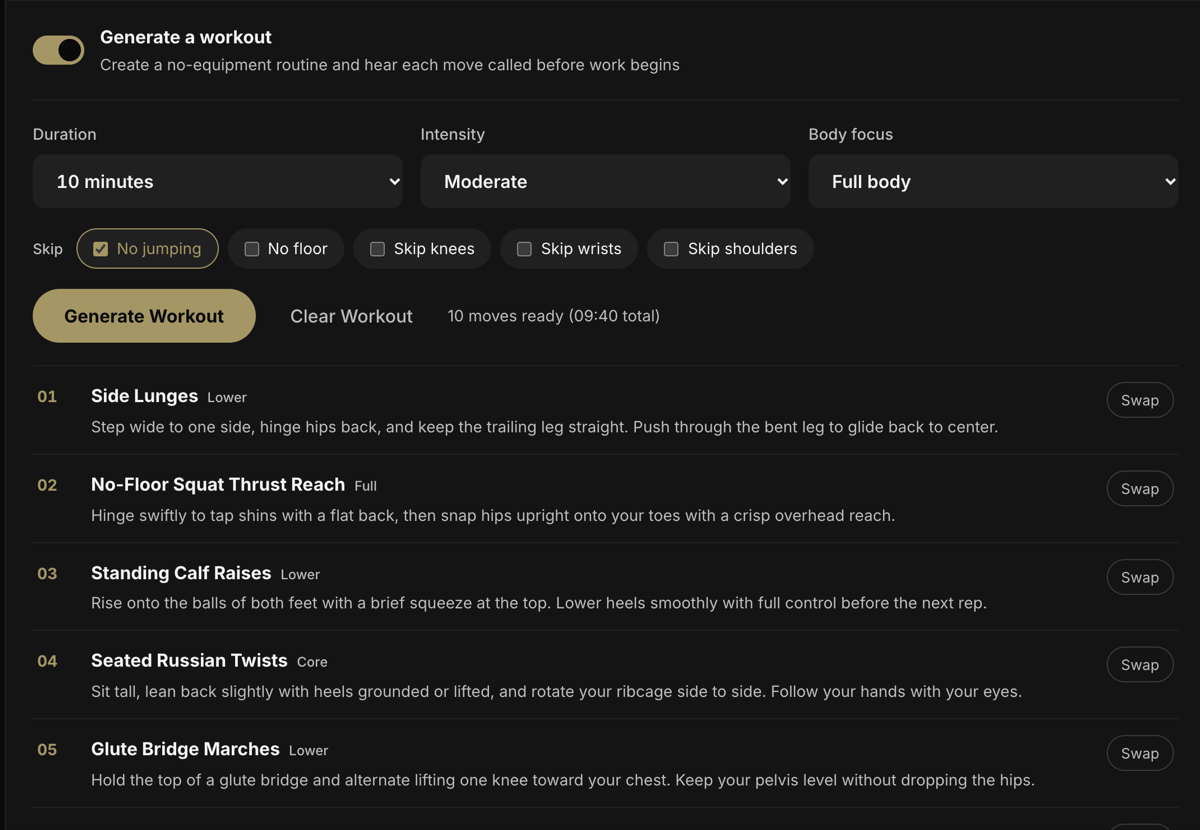
How the No-Equipment HIIT Workout Generator Works
Decision fatigue stops more home workouts than lack of time. Opening a blank interval timer often leads to ten minutes of scrolling workout videos before you even step on the mat. The IntervalCue HIIT workout generator solves that friction by pairing instant routine creation directly with the countdown clock.
When you click Generate Workout, the tool filters our 54-exercise bodyweight library against your chosen intensity ceiling, target body focus, and skip rules. It then calculates the number of rounds required to hit your selected 10, 15, 20, or 30 minute duration based on your active work and rest settings, and sequences the rounds so back-to-back exercises avoid repeating the same movement pattern whenever possible.
Hands-Free Training With Spoken Exercise Callouts
During live playback, the generator turns your device into a voice-cued floor coach:
- Before work starts: as the final three seconds of rest tick down, Web Speech announces the upcoming exercise name out loud so you can shift stance without walking over to read the screen.
- During work: the display highlights the current exercise name in large high-contrast type along with a concise two-line coaching cue covering posture and tempo, plus a preview of the next round below it.
- No external accounts or uploads: your filters, swapped rounds, and saved workout plans stay in browser localStorage. Even if your connection drops mid-session after the page loads, the timer, synthesized beeps, and generated queue continue running cleanly in your browser.
For pure rep-based workouts where you prefer counting rounds yourself, pair your favorite three moves with our AMRAP timer or EMOM timer.
Movement Filters and What They Exclude
Combine any set of skip filters below the timer to adapt the 54-exercise bodyweight library to your room, neighbors, or sensitive joints.
| Filter Option | Movements Excluded | Example Replacements Kept | Best Scenario |
|---|---|---|---|
| No jumping | Burpees, jump squats, split jumps, high knees, jumping jacks | Bodyweight squats, fast skater steps, step jacks, shadow boxing | Upstairs apartments, quiet mornings, low-impact recovery |
| No floor | Push-ups, planks, bridges, dead bugs, mountain climbers | Lunges, standing cross crunches, woodchops, scapular pulls | Hotel rooms, carpeted spaces, training without a mat |
| Skip knees | Deep squats, lunges, jump variations, bear holds | Good mornings, glute bridges, floor swimmers, uppercuts | Sore knees or patellar tendon sensitivity |
| Skip wrists | Push-ups, high planks, inchworms, shoulder taps, dips | Forearm plank, standing boxing, lunges, dead bugs | Desk-worker wrist stiffness or floor-hand discomfort |
| Skip shoulders | Push-ups, overhead reaches, planks, jacks | Squats, bridges, reverse lunges, bicycle crunches, power march | Overhead mobility limits or shoulder fatigue |
Four Steps to a Custom No-Equipment Workout
Because the generator sits directly inside the IntervalCue timer, you never copy exercises between two apps.
-
Set your preferred work and rest ratio first
Leave the timer on 40/20 for classic circuit flow, tap 30/30 for beginner-friendly recovery, or choose 20/10 for a crisp Tabata block. The generator automatically calculates round count to match your chosen duration.
-
Select duration, intensity, body focus, and skip filters
Pick 10, 15, 20, or 30 minutes, choose Beginner, Moderate, or Hard difficulty, and check any space or joint constraints you want respected.
-
Click Generate Workout and swap any individual round
Scan the numbered exercise list below the controls. If one move feels redundant or does not fit your room, press Swap on that row to pull a fresh matching alternative from the library.
-
Press Start, save the plan, or share the link
Once you like the lineup, press Start to launch countdown beeps and spoken cues. Press Save Plan to keep that exact sequence in your browser, or click Share to send the preloaded workout URL to a friend.
HIIT Workout Generator FAQ
How many exercises are in the IntervalCue bodyweight library?
The static library includes 54 no-equipment exercises spanning lower body, upper body, core, and full-body conditioning, each paired with concise two-line coaching cues.
Does the workout generator repeat the exact same muscle group back to back?
When Full body focus is selected, the sequence builder actively rotates between lower body, upper body, core, and full-body movements so adjacent rounds avoid stacking the same local fatigue.
Can I combine both No jumping and No floor at the same time?
Yes. Checking both filters restricts the workout exclusively to quiet standing exercises such as squats, lunges, good mornings, standing core drives, fast shadow boxing, and low-impact marches.
Why do generated exercises show text cues instead of animated figures?
Large text movement names and short coaching cues stay readable from across a room and load instantaneously with zero heavy video downloads. Every movement is chosen for straightforward, familiar bodyweight execution.
Will a shared workout link auto-start when my friend opens it?
No. Shared links load the exact timer intervals and generated exercise sequence into Ready state so the other person can review the moves and press Start when ready.